guide · home-runs / voltage-drop / conduit-fill / pull-schedule
Home run planning with ZapSketch: a step-by-step guide
How to plan electrical home runs: set the scale, place the panel, draw each run, and check wire size, voltage drop and conduit fill. With a by-hand method for every step.
Home run planning is working out the route and length of every branch circuit from the panel to its devices, so wire size, voltage drop and conduit fill can be checked before anyone pulls wire. In ZapSketch you draw each run on a plan PDF or a quick sketch, and it measures the routed length, counts the conductors in every raceway and checks the wire and conduit against NEC 2023 as you draw.
This guide walks through a whole job, from an empty sheet to an exported pull schedule. Every step has a short By hand note on how electricians do the same thing with a scale ruler and a notepad, so it is useful whether or not you ever open ZapSketch. The screenshots and the worked example come from the residential demo project in the app: a 66 ft × 34 ft three-bedroom ranch with a 200 A, 120/240 V panel in the garage.
What a home run is
A home run is the wiring that carries a branch circuit from the panel to the first box or device on that circuit. On a plan it is the arrow pointing back toward the panel, tagged with the circuit number. Past that first box the circuit continues device to device, but the home run is usually the longest single piece, and in conduit work several home runs often share the same raceway back to the panel.
Planning home runs means deciding where each one goes: which walls and ceilings it follows, which circuits share a raceway, and how long the wire really is from the breaker to the last device. Those three things set the conductor size, the conduit size and most of the wire on the takeoff.
Why the route is longer than the drawing looks
The most common mistake is measuring the straight line on the plan. Wire doesn’t travel in a straight line. It follows walls, goes around rooms and stairs, and on a multi-outlet circuit it carries on device to device, so the length that matters for voltage drop runs to the last device on the circuit, not the first.
Voltage drop grows with length, so a straight-line measurement here would understate the drop about three times over. The voltage drop guide has another example of the same effect, and the worked example below runs the numbers for this circuit.
Step by step
Step 1: Open the plan and set the scale
Start a project from a plan PDF (pick the pages you want as sheets) or on a blank sheet, where you can sketch walls and dimensions yourself. The residential demo is a sketch: no PDF, just walls and dimensions drawn in ZapSketch.
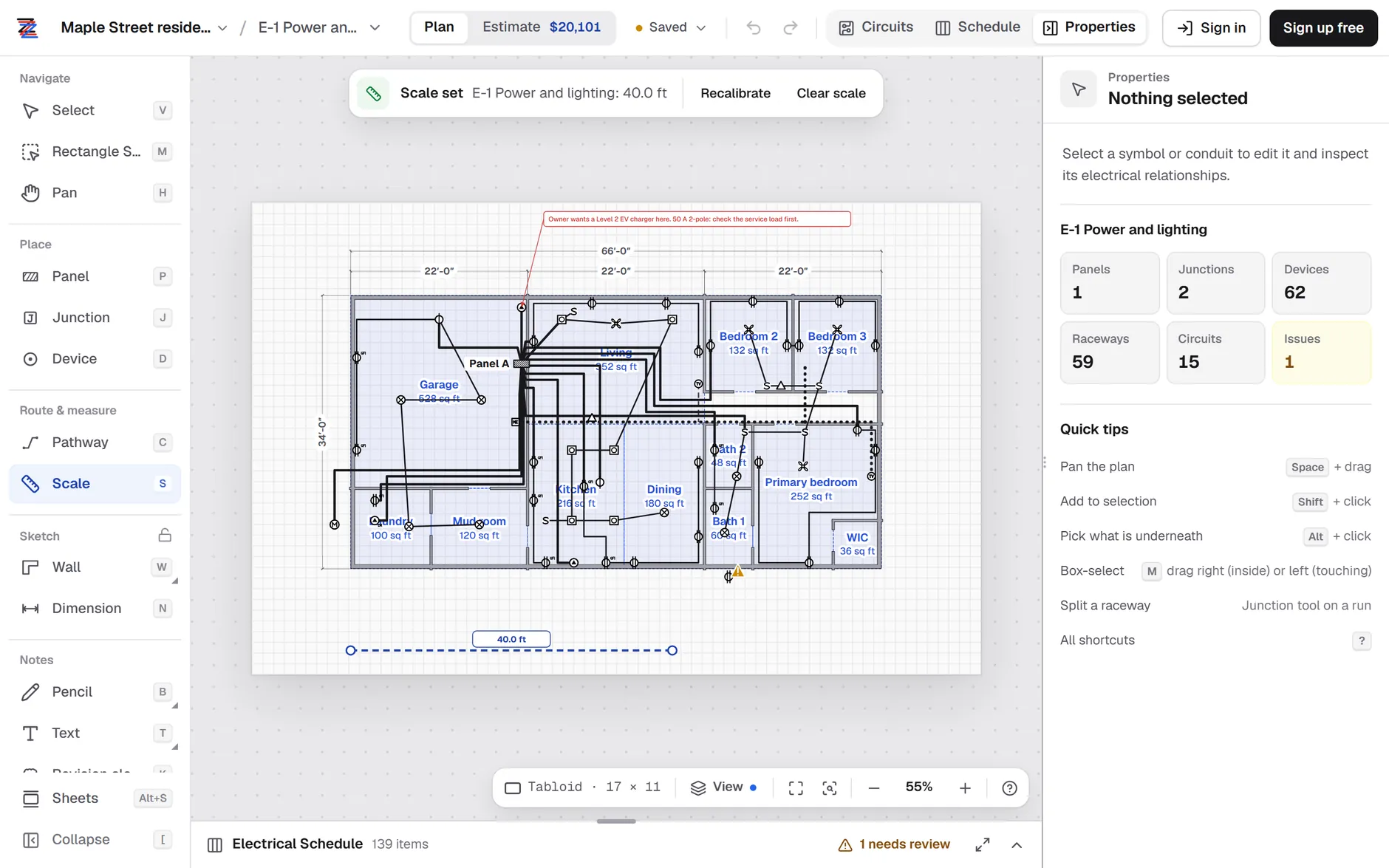
Then pick Scale and drag across a dimension you know, such as a 22′-0″ wall or a grid line. Every length ZapSketch measures after that comes from this calibration, so use the longest dimension you can find and check it against a second one.
Step 2: Place the panel
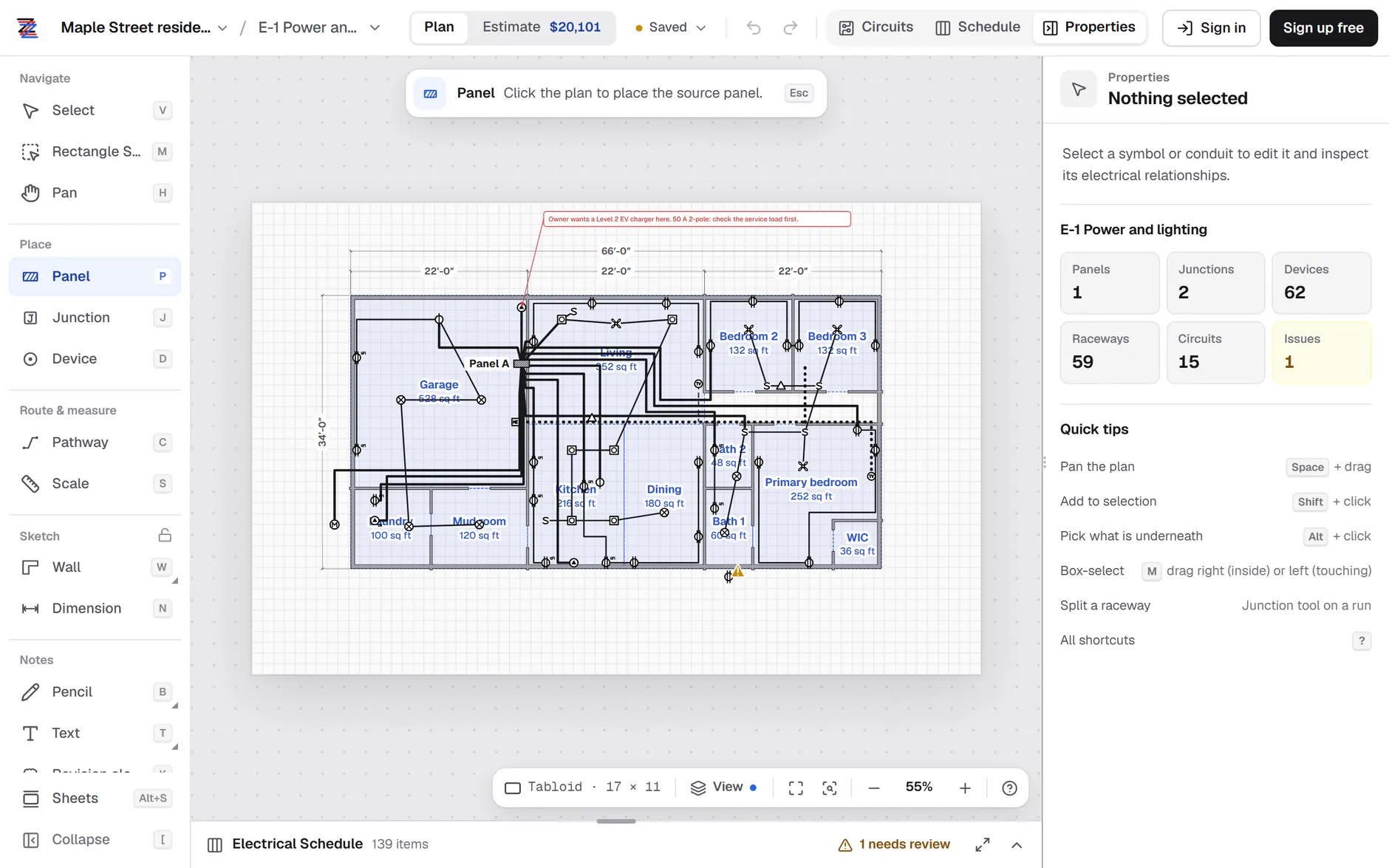
Pick Panel and click where the panel sits. Every home run starts here, so place it first. Select it to set its name, voltage and size; its Properties card also lists every circuit it feeds with its route length. The demo’s Panel A is a 200 A, 120/240 V single-phase panel on the garage wall with 15 circuits.
Step 3: Place the devices
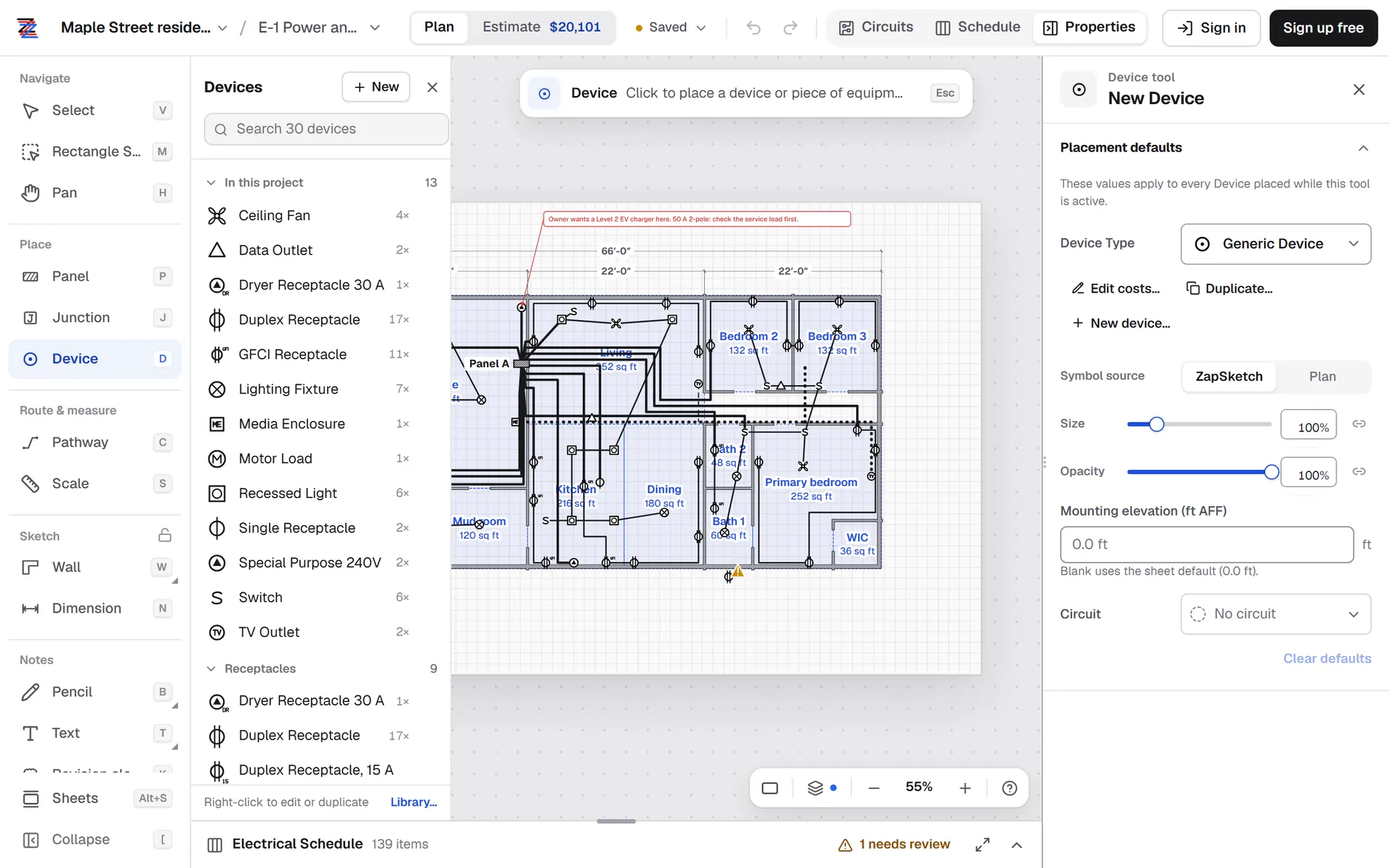
Pick Device, choose a type from the list (receptacles, GFCIs, lights, switches, fans, equipment and low-voltage outlets) and click to drop each one. The list shows how many of each type the project already has, so the count builds as you go. Placement defaults let you set a circuit and a mounting height before you click, which saves a step when you place a room’s worth of devices at once.
Step 4: Group devices into circuits
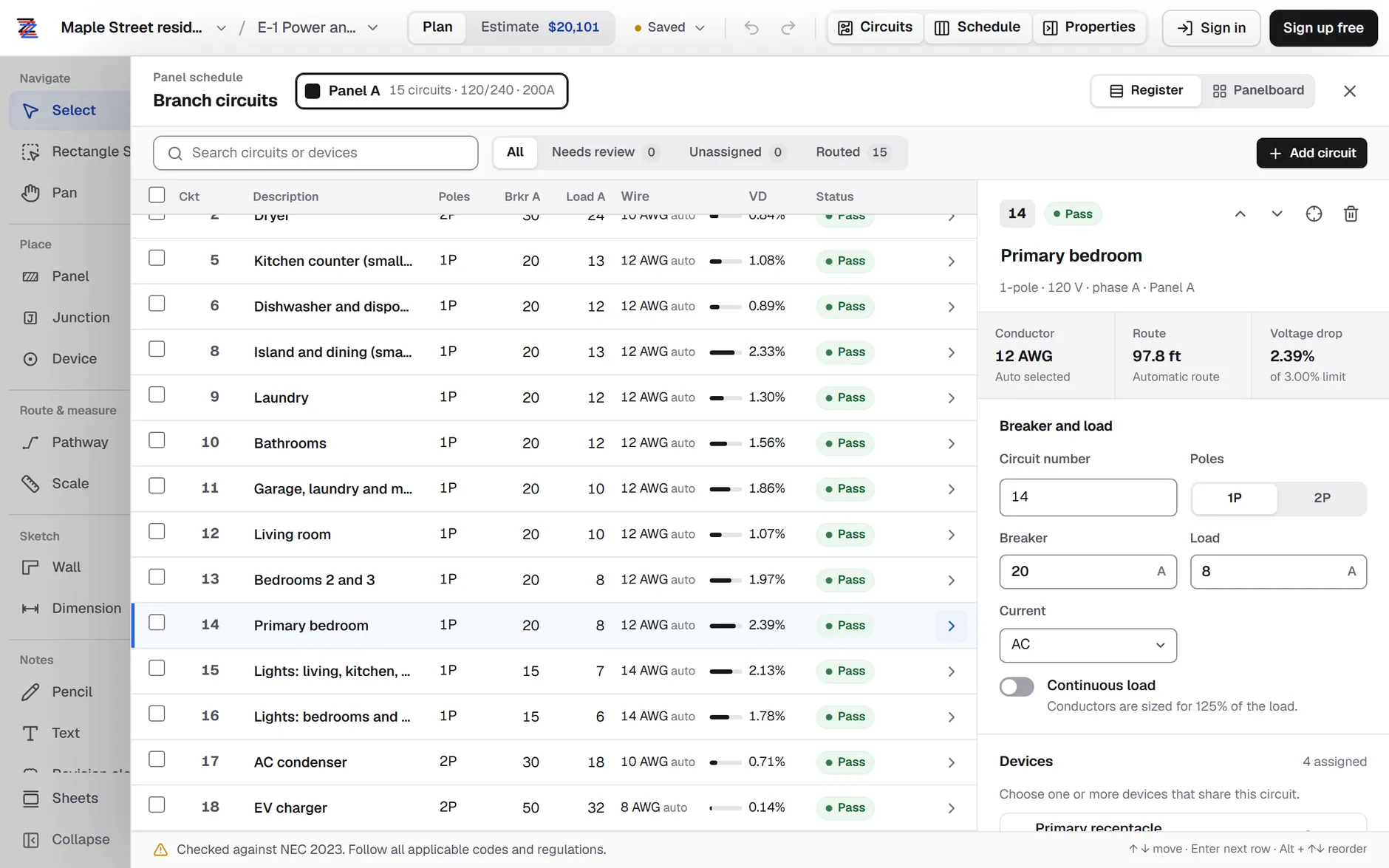
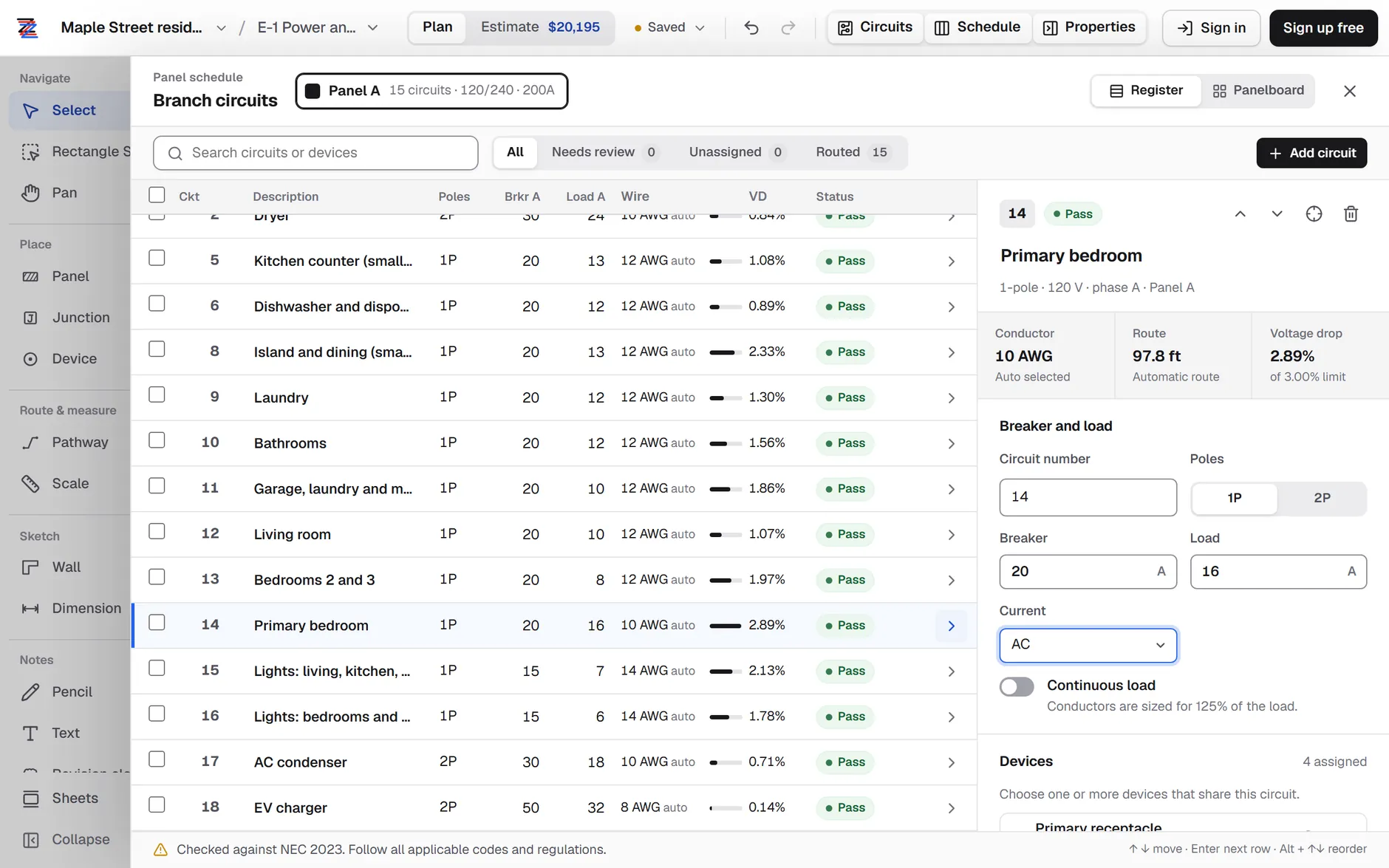
Open Circuits to see the panel schedule. Add a circuit, give it a breaker size and a load, and assign the devices it feeds, either from the circuit’s device list or by setting the circuit in the Device tool’s placement defaults. The demo groups the primary bedroom’s four receptacles on circuit 14: a 20 A breaker with an 8 A load.
Step 5: Draw each run
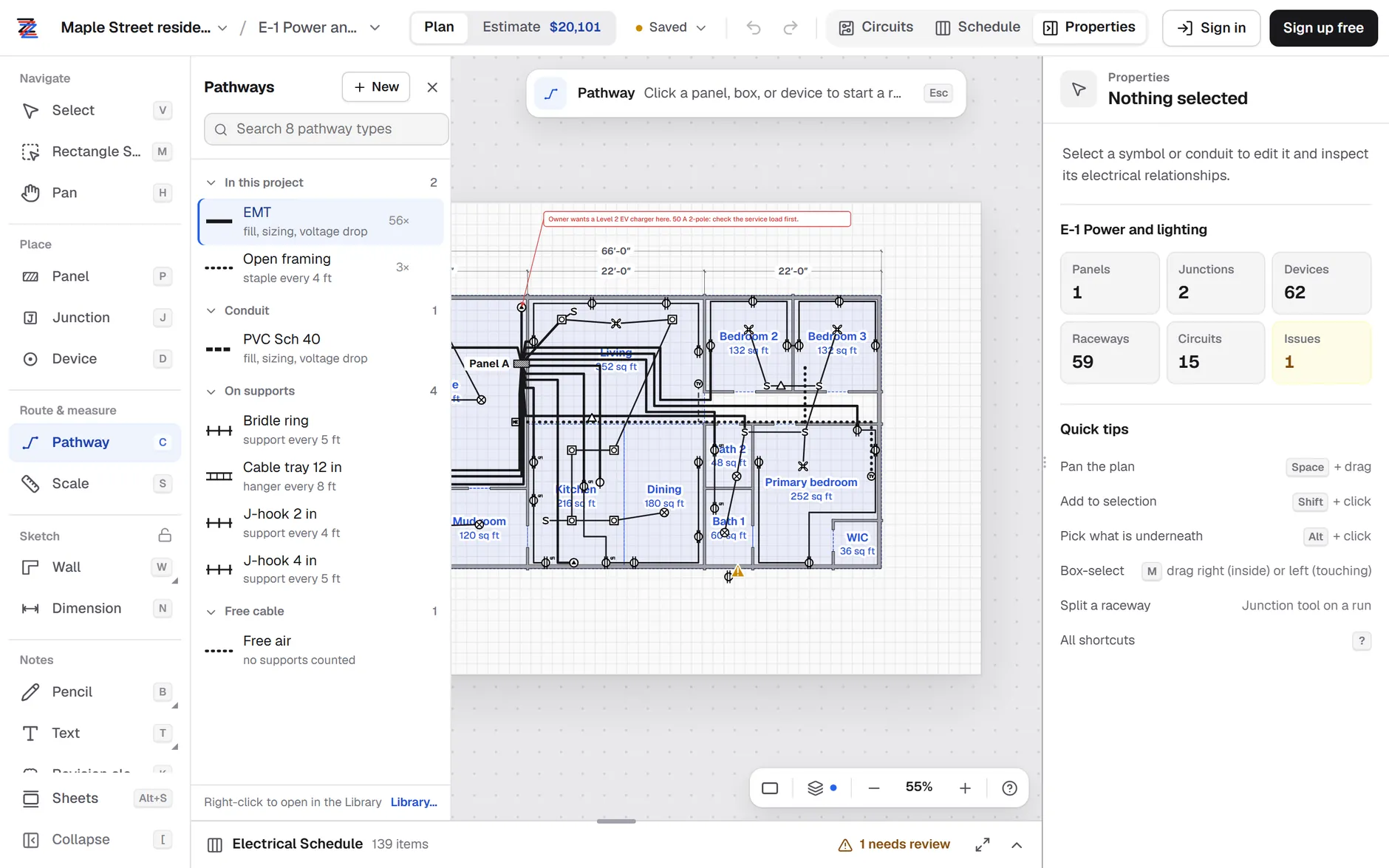
Pick Pathway, choose the raceway type (EMT, PVC Schedule 40, or open cable types such as framing, J-hooks or tray), then click the panel, click to add each bend, and finish on a box or device. ZapSketch measures each segment as you draw it from the scale you set in step 1. Where runs share a raceway, draw it once and let the circuits ride in it: ZapSketch finds each circuit’s route from the panel to its devices through the raceways you drew.
Step 6: Count the conductors in each raceway
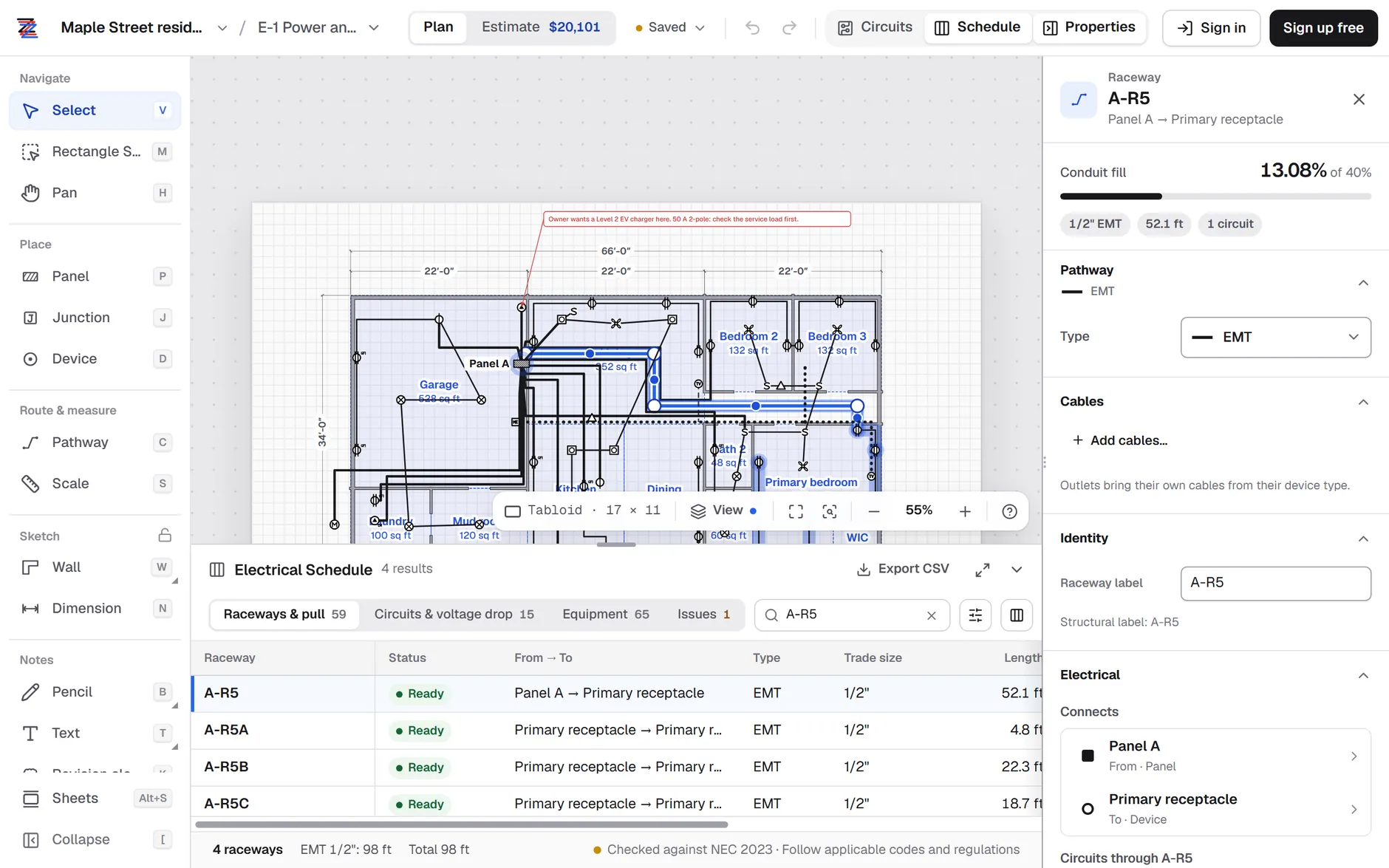
Open the Schedule and the Raceways & pull tab. Every raceway segment gets a row with its from and to, type, trade size, length, fill and the number of conductors in it. Select a row to see it on the plan, with the circuits that pass through it. In the demo, A-R5 is the primary bedroom home run: 52.1 ft of 1/2″ EMT carrying one circuit.
Step 7: Check ampacity, voltage drop and fill
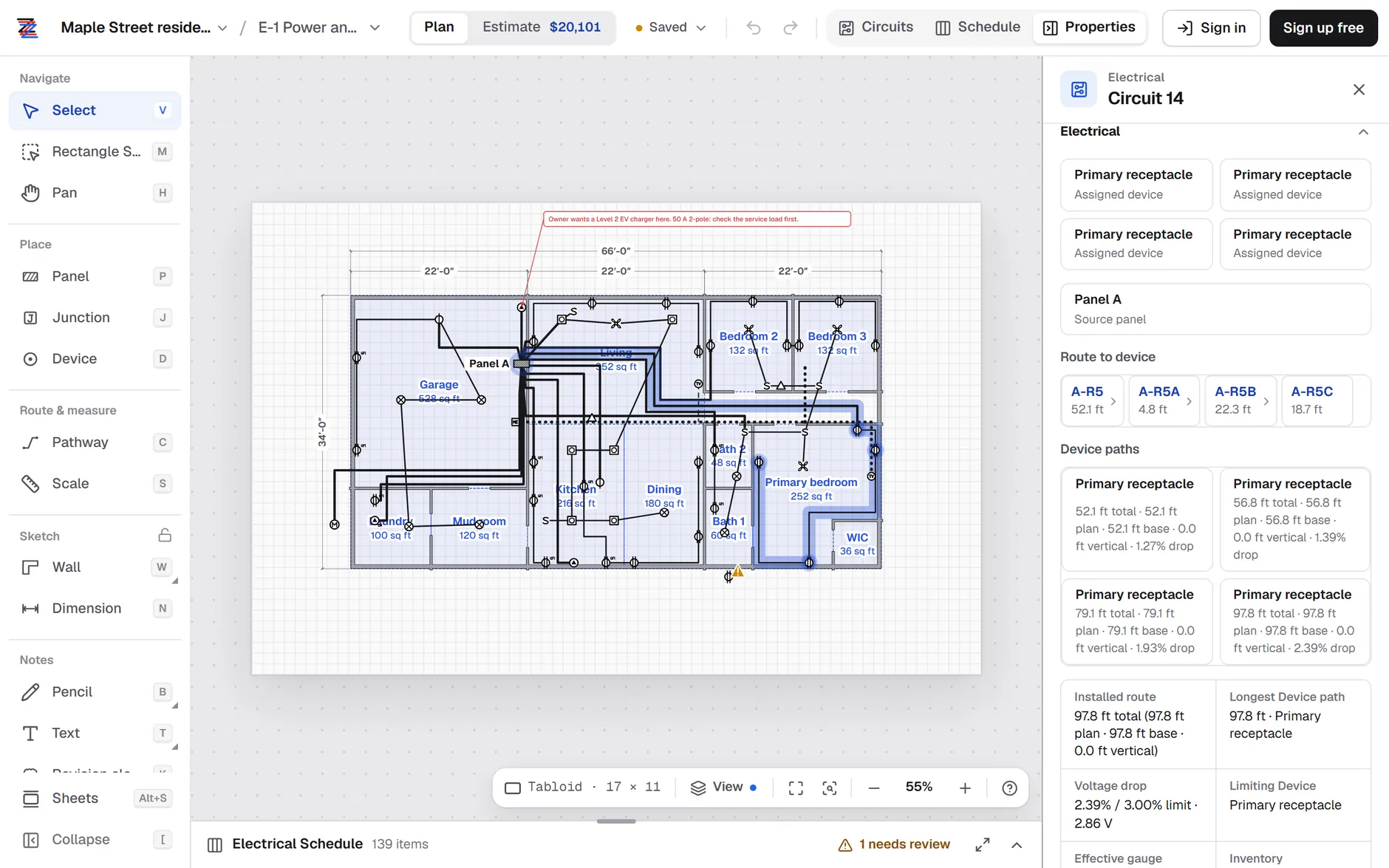
These checks run as you draw. Circuits & voltage drop lists every circuit with its breaker, load, conductor, route length and voltage drop to its farthest device. With the conductor on Auto, ZapSketch picks the smallest size that carries the load at its terminal and ambient temperatures and stays within the voltage-drop limit you set (3% by default). The raceway rows check fill for the conductors inside. Select a circuit to see the length and drop to each of its devices.
Step 8: Fix a flagged run
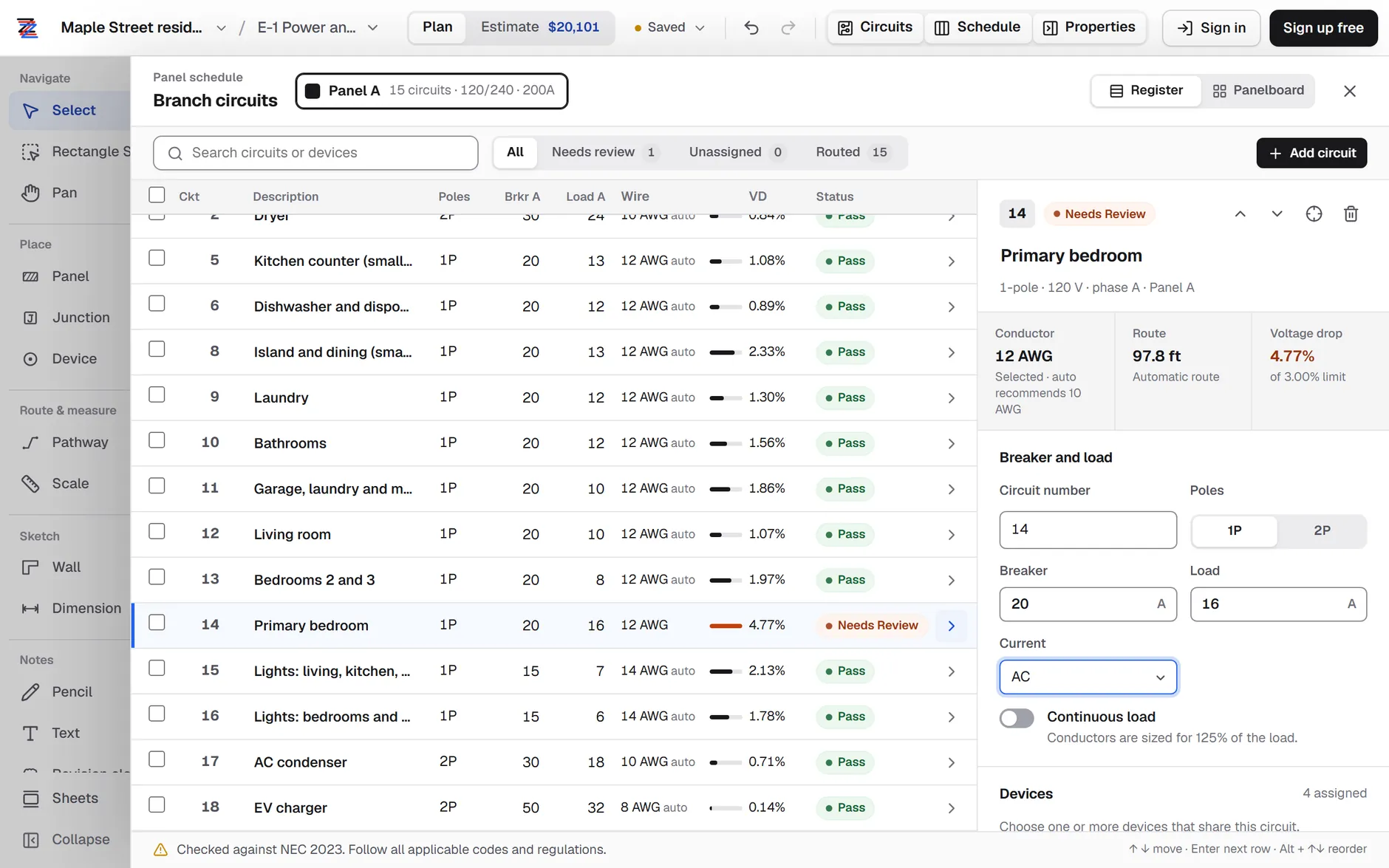
When a check fails, the circuit’s status changes from Pass to Needs review, and the panel schedule’s Needs review filter collects every circuit like it. The circuit card shows the size Auto would pick. The fix is usually a bigger conductor, a shorter route, or splitting the circuit. Set the conductor back to Auto and ZapSketch picks the smallest size that passes, and the estimate updates with it. The demo also keeps one real issue for you to find: a patio receptacle that hasn’t been put on a circuit yet.
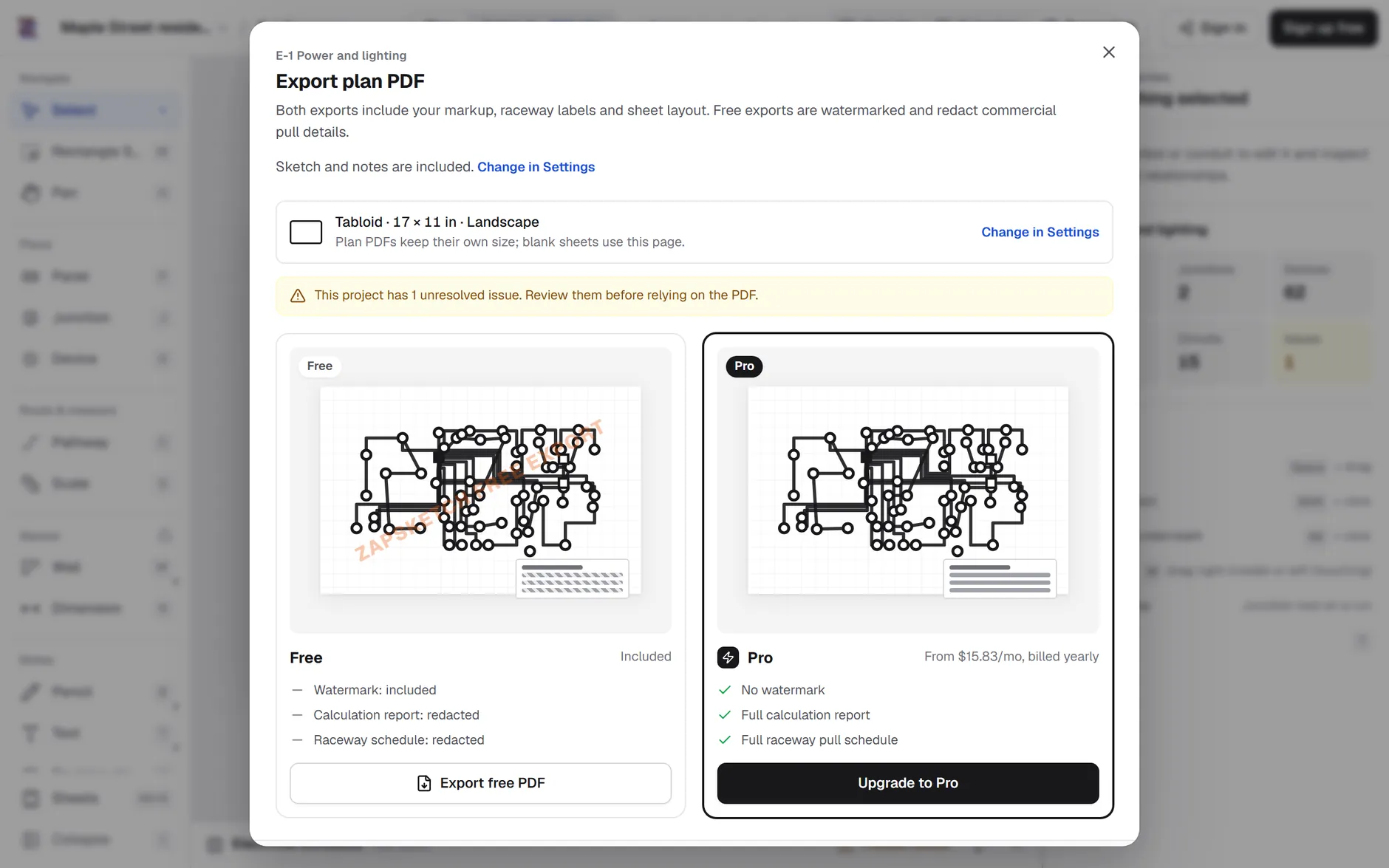
Step 9: Export the plan and the pull schedule
Export PDF in the project menu saves the marked-up plan with your raceway labels and sheet layout, generated in your browser. On the Raceways & pull tab, Export CSV saves the pull schedule as a spreadsheet: one row per raceway with its from and to, type, trade size, length, fill and conductors. Free PDF exports are watermarked and redact the commercial pull details; Pro adds the full raceway pull schedule and calculation report to the PDF.
Worked example · residential demo
Worked example: the primary bedroom circuit
Circuit 14 feeds the four primary bedroom receptacles from Panel A. It has the longest route in the demo, so it is the one to check first.
- Breaker and load
- 20 A, 8 A load, 120 V
- Devices
- 4 duplex receptacles
- Straight line to the farthest receptacle
- 32 ft
- Routed length to it
- 52.1 + 4.8 + 22.3 + 18.7 = 97.8 ft
- Home run raceway A-R5
- 1/2″ EMT, 3 #12 THHN, 13.1% fill
- Voltage drop on #12 at 8 A
- 2.86 V, 2.39% · Pass
Check the drop by hand. At a power factor of 0.9 in steel conduit, Chapter 9, Table 9 gives #12 copper an effective Z of 1.830 Ω per 1,000 ft:
That matches ZapSketch to the hundredth. Measured on the straight line, the same circuit would show 0.78%, a third of the real figure.
Now say the owner adds load and the circuit carries 16 A. #12 still carries 16 A on a 20 A breaker (NEC 2023). The drop doubles:
- #12 at 16 A
- 4.77% · Needs review
- #10 at 16 A (Auto)
- 2.89% · Pass
ZapSketch flags the circuit at 4.77%, over its 3% limit, and Auto moves it to #10 (Z = 1.107 Ω): 3.46 V, or 2.89%. The straight-line number would have read 1.56% and passed. That is the difference between measuring the drawing and measuring the route.
The fill check holds too: three #12 THHN conductors are 3 × 0.0133 = 0.0399 in², 13.1% of 1/2″ EMT’s 0.304 in², under the 40% allowed for three or more conductors (NEC 2023). With three #10s (3 × 0.0211 = 0.0633 in²) the same conduit is at 20.8%.
Questions
Do I need a plan PDF? No. You can start on a blank sheet and sketch walls and dimensions, which is how the residential demo was drawn. When the plans arrive, upload the PDF and set its scale.
Does ZapSketch route the wire for me? You draw the raceways; ZapSketch finds each circuit’s path from the panel to its devices through them and measures it. You can also edit a circuit’s route by hand.
What does it check? Conductor ampacity, voltage drop to every device, and conduit fill for conduit such as EMT and PVC Schedule 40, against NEC 2023 tables. Open pathways such as J-hooks and cable tray count cables and supports instead of fill.
Can I try it without signing up? Yes. ZapSketch runs in the browser, and both demo projects open from the start screen with no account.
Try it on your own plan
Plan your next job's home runs
Open a plan PDF or start a sketch in your browser and draw the first run. Or open the residential demo from this guide and change the primary bedroom circuit yourself.